How to save a color palette on iPhone

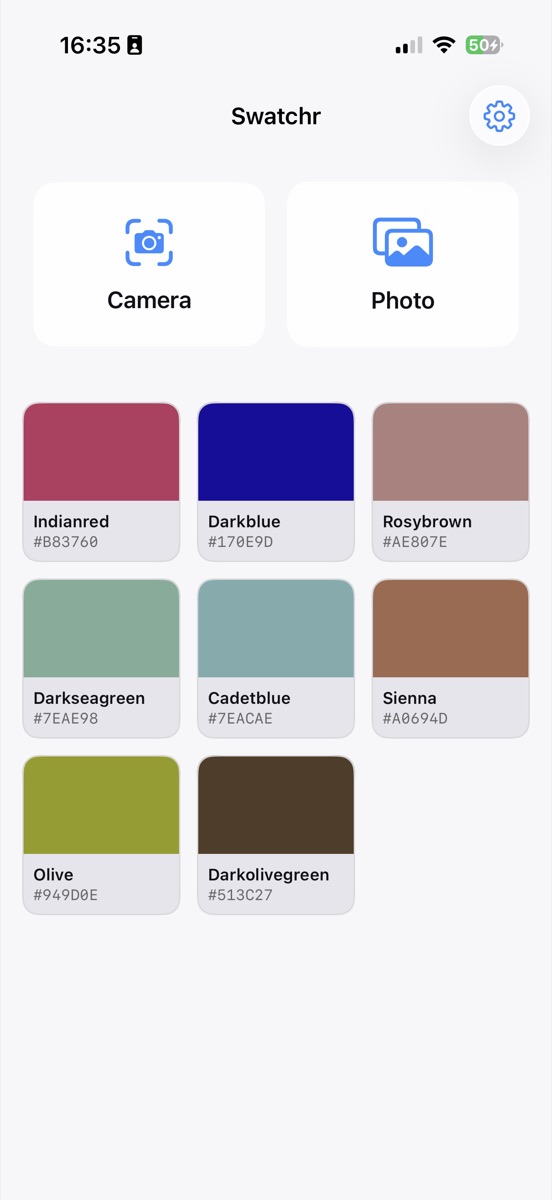
There is a plus button on the readout card next to every color you pick. Tap it and the color joins a grid of saved swatches, each one showing the swatch itself, its name and its hex code. In Swatchr the palette comes with the one-time unlock. It holds as many colors as you want and lives on the device rather than in an account somewhere.
What most people do instead, and why it stops working
The usual system is a folder of screenshots, or a note with hex codes typed into it. Both work for about a fortnight. Screenshots lose their order and give you no way to search, and a note of hex codes is unreadable because #7EAE98 tells you nothing about what the color looks like.
A palette solves the specific problem that a color needs to be seen and identified at the same time. Swatchr's grid shows the swatch, the CSS name and the hex together, so you recognize the one you want before you read anything.
Saving harmony suggestions too
The complement and analogous colors under each pick have their own plus buttons. If you are building a scheme around one base color, you can capture the whole set in four taps rather than picking each one separately.
That is usually how a palette starts: one color off a photograph, then its neighbors, then a couple of adjustments made later once you have seen them together.
Getting colors back out
Tap any saved swatch to open it full size with all four format codes, the same as a fresh pick. Copy whichever one you need.
For sending a color to somebody else, the export card turns a swatch into an image with the name and all four codes laid out, which is easier to act on than a hex code pasted into a message on its own.
Common questions
Do saved colors sync between my devices?
No. Swatchr has no account and no server, so the palette lives on the device it was created on and is included in your encrypted device backup.
Is there a limit on how many colors I can save?
No limit once the unlock is active. It is a one-time purchase rather than a subscription.
Try it yourself
Swatchr reads the color of anything your camera can see, or any point in a photo, and hands you the hex, RGB, HSL and CMYK.
Download on the App Store