Put a color picker widget on your iPhone Home Screen

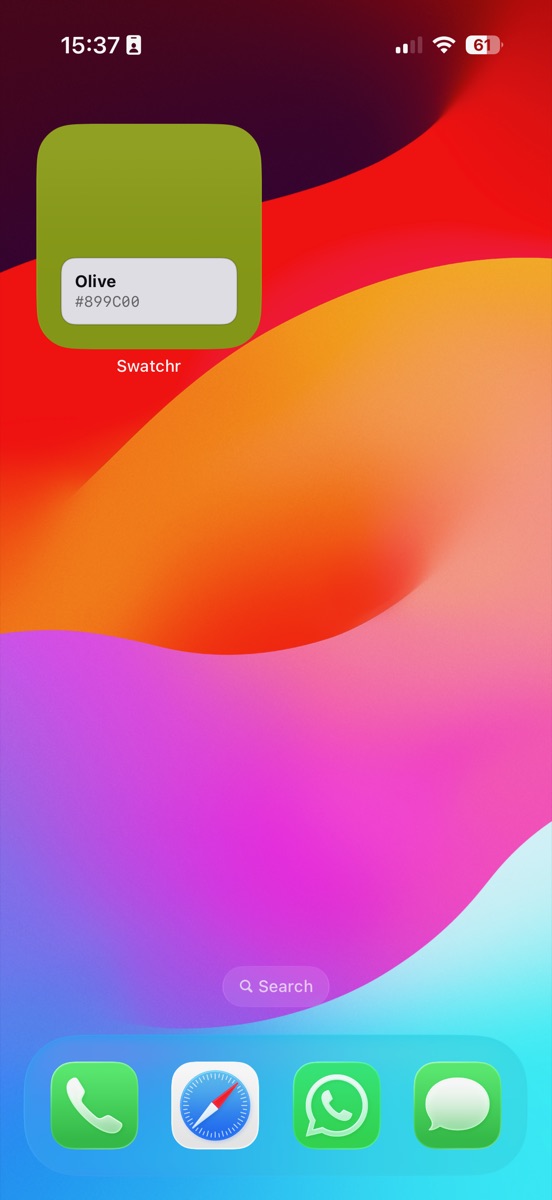
Long-press an empty area of the Home Screen, tap Edit then Add Widget, search for Swatchr and add the small size. The widget shows your latest saved color as a filled swatch with its name and code underneath, and it updates whenever you save a new one.
Add the Swatchr widget to your Home Screen
- Enter edit mode. Press and hold an empty part of the Home Screen until the icons start to jiggle, then tap Edit and choose Add Widget.
- Find Swatchr. Search for Swatchr in the widget gallery and select the small widget.
- Place it. Drag it where you want it and tap Done. It fills with your most recently saved color.
What the widget is actually for
It is a reminder rather than a tool. When you are working to a particular color for a week, having it sitting on the Home Screen means you stop second-guessing whether the green you are looking at is the right green.
Tapping it opens Swatchr on that color, so it doubles as a shortcut to the codes when you need to paste one somewhere.
Choosing which color it shows
By default the widget follows the most recent addition to your palette. Save a new color and the widget catches up at the next refresh, which iOS schedules rather than doing instantly.
The widget is part of the one-time unlock, along with the saved palette it draws from, so it needs at least one saved color before it has anything to display.
If it is not updating
iOS decides when widgets refresh and it is stingy about it, particularly on Low Power Mode. A widget that looks stale is usually waiting for its next allotted refresh rather than broken.
If it stays wrong for longer than a few minutes, opening the app forces the shared data to be rewritten. Removing the widget and adding it again clears anything more stubborn than that.
Common questions
Can I put the widget on the Lock Screen?
The current version ships a small Home Screen widget. Lock Screen sizes are a different widget family and are not included yet.
Does the widget work without opening the app?
Yes. It reads from a shared store on the device, so it displays your latest saved color whether or not the app is running.
Try it yourself
Swatchr reads the color of anything your camera can see, or any point in a photo, and hands you the hex, RGB, HSL and CMYK.
Download on the App Store