How to pick a color with your iPhone camera

Your iPhone camera can act as a live eyedropper. Aim it at the wall, the fabric or the printed sample, put the crosshair on the color, and the value updates as you move. Nothing is captured or saved unless you choose to save it. The advantage over photographing something first is that you can walk around the object and watch how the reading shifts under different light.
Why live sampling beats photographing first
When you photograph something and sample it later, you are stuck with whatever the camera decided about exposure and white balance at that moment. Live sampling lets you see the reading move. Tilt the phone, step out of the shadow, turn away from the window, and watch the numbers settle.
That movement is information. If a wall reads #C8BFA6 from one angle and #B4A98E from another, neither is wrong. You are seeing how much the light is doing, and you can pick the reading that matches the conditions you actually care about.
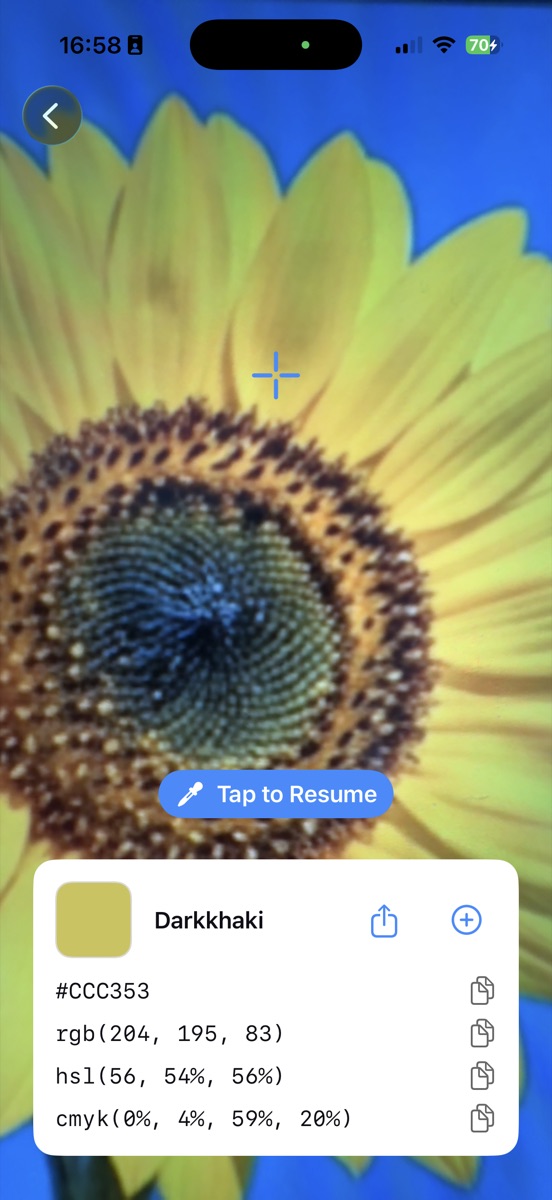
Freezing the reading before you lose it
Holding a phone steady while reading four rows of numbers is awkward. Tap once and the sample locks; the button changes to Tap to Resume so you can lower the phone and read the card properly.
The frozen reading behaves like any other pick. You can copy any of the four formats from it, look at the harmony suggestions, or save it to your palette if you have the unlock.
Where the camera reading will mislead you
Three situations to watch. Glossy surfaces bounce the light source straight back, so you sample the bulb rather than the paint. Fluorescent and LED lighting shifts hue noticeably, usually green or blue. And auto-exposure adapts to whatever fills the frame, which means a dark object framed tightly comes out lighter than it is.
The fix for all three is the same: fill less of the frame with the target, get out of direct light, and take a second reading from a different angle. If the two agree you can trust them.
Common questions
Does Swatchr save photos while I am picking?
No. The camera feed is sampled for a pixel value and nothing is written to your library or sent anywhere.
Can I use it on a computer screen?
You can, but a photo of a screen picks up moiré and the screen's own color cast. A screenshot sampled from the photo library is more accurate.
Try it yourself
Swatchr reads the color of anything your camera can see, or any point in a photo, and hands you the hex, RGB, HSL and CMYK.
Download on the App Store